Unblocking a quarterly risk review
A redesigned first step for the bank's AI risk review tool: an uploader that shows users which files are still missing and tells them when they're done.
Iteration
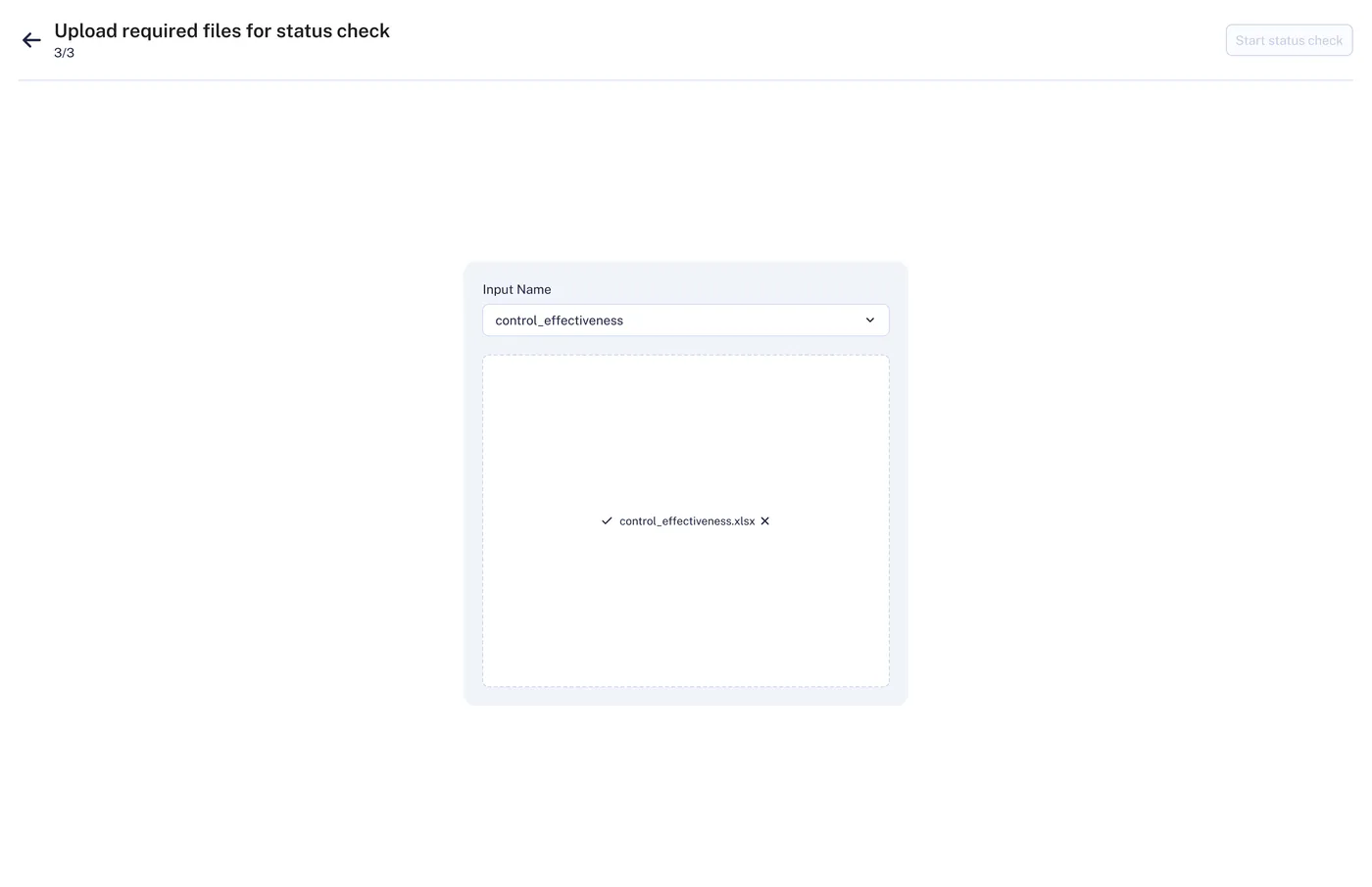 Before
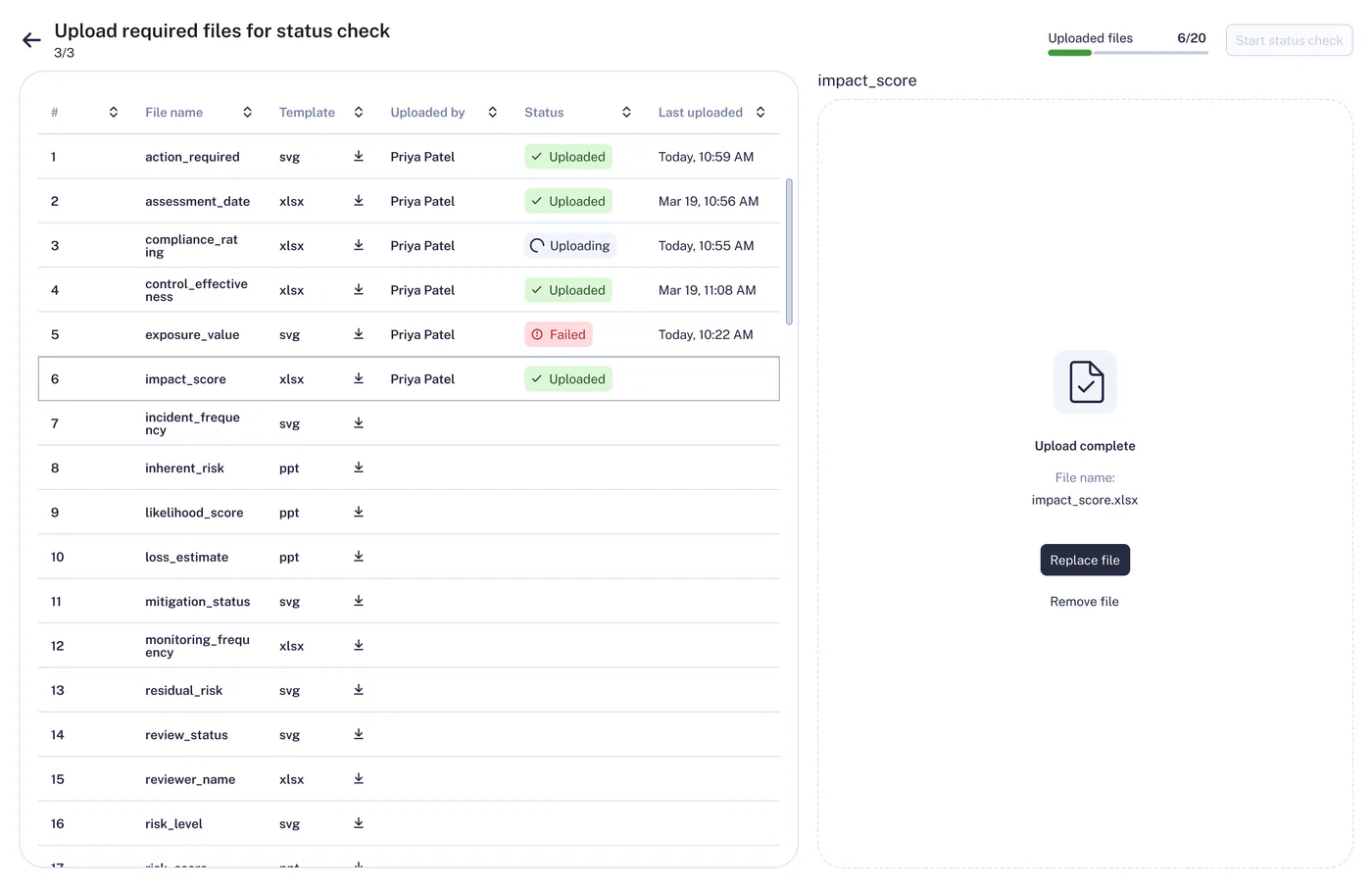 After
After
Confidential project. Same layout and flow as the shipped tool; file names, column labels and data are changed. Results are from the real test.
Context
Every quarter, the bank checks where it stands against its risk limits. 16 departments each write about 30 conclusions, so almost 500 get reviewed by hand, in scattered places. The team built an AI tool for this review. The tool pulls in some files on its own, but users upload the other 20 by hand before they can start. We were running out of time, so we reused many components from our design system, the uploader among them.
An unmoderated usability test, where users try the tool on their own without a facilitator, was meant to validate the core flow. Most users never got past the upload. My task was to find out why and fix it before the next quarterly cycle.
Actions
How I got there
Found where users got stuck, in their own words
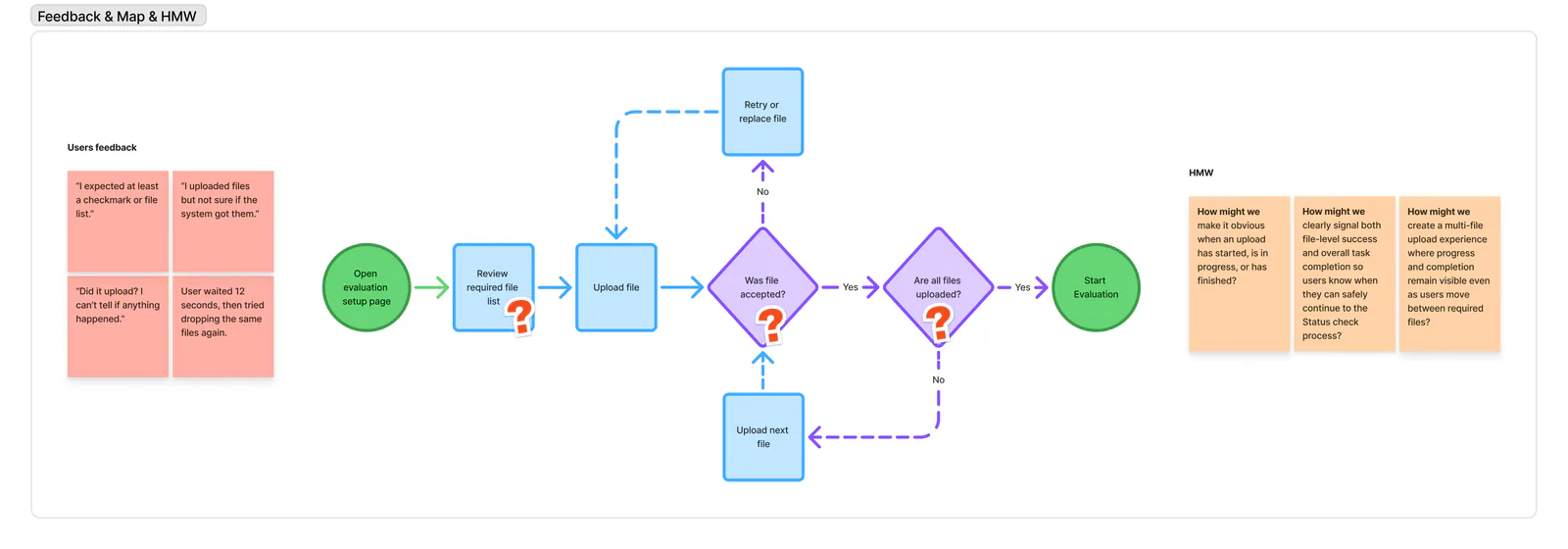
During the test, users posted their feedback in our Teams channel. They couldn't tell whether their files had uploaded, and one wrote that they waited 12 seconds before retrying. The project manager and I then interviewed those users, to see how they worked with the uploader and what was going wrong.
I mapped every upload step, including the retry loop, up to "Start status check". The break was at the very first step, not in the AI review.
Named the root causes
I found four. Users picked each required file from a dropdown, one by one. The uploader reset after every pick and hid the files already uploaded. Feedback was weak, with no progress. And there was no "all done" state.
I turned each cause into a "How might we…" question, which frames a problem as an open design challenge.
Looked at other products, then designed every state
I reviewed how other products handle uploads and ranked the ideas on an impact vs effort chart. Then I designed hi-fi screens for every state, from no file selected to upload complete.
Key decisions
Fix the way in first
Uploading files was the only way into the tool. Until users got their files in, they couldn't start the status check, so nothing else in the workflow could help them.
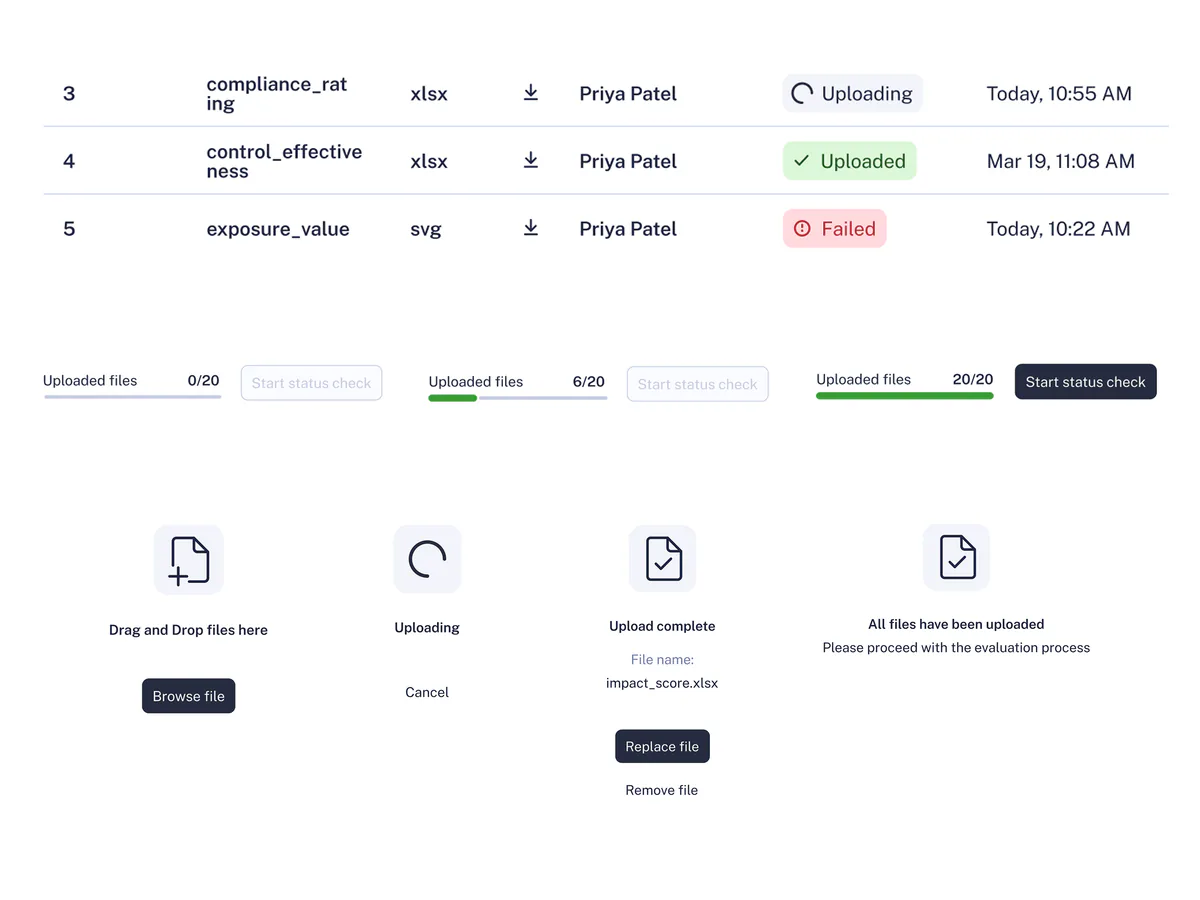
So I put all 20 files in one table, where users see every file they need at once, each with its own status. The rest of the tool stayed the same: the whole fix was one new screen.
I looked at two other ideas. The first was to let users drop all their files at once and have AI put each one in the right place. But many of our files look alike. If the AI put one in the wrong place, the risk review would run on the wrong data, and nobody would notice. Users would have to check every file anyway, and we'd need an AI model plus a screen to fix its mistakes. The second was to add clearer messages to the old uploader. It was the easiest, but users would still pick each file from a dropdown, one at a time, and still couldn't see which files were missing.
The downside of my choice: the frontend and backend engineers had to pause other tasks to build the fix, which delayed that work by 4 days.
Show the status of each file and a clear finish
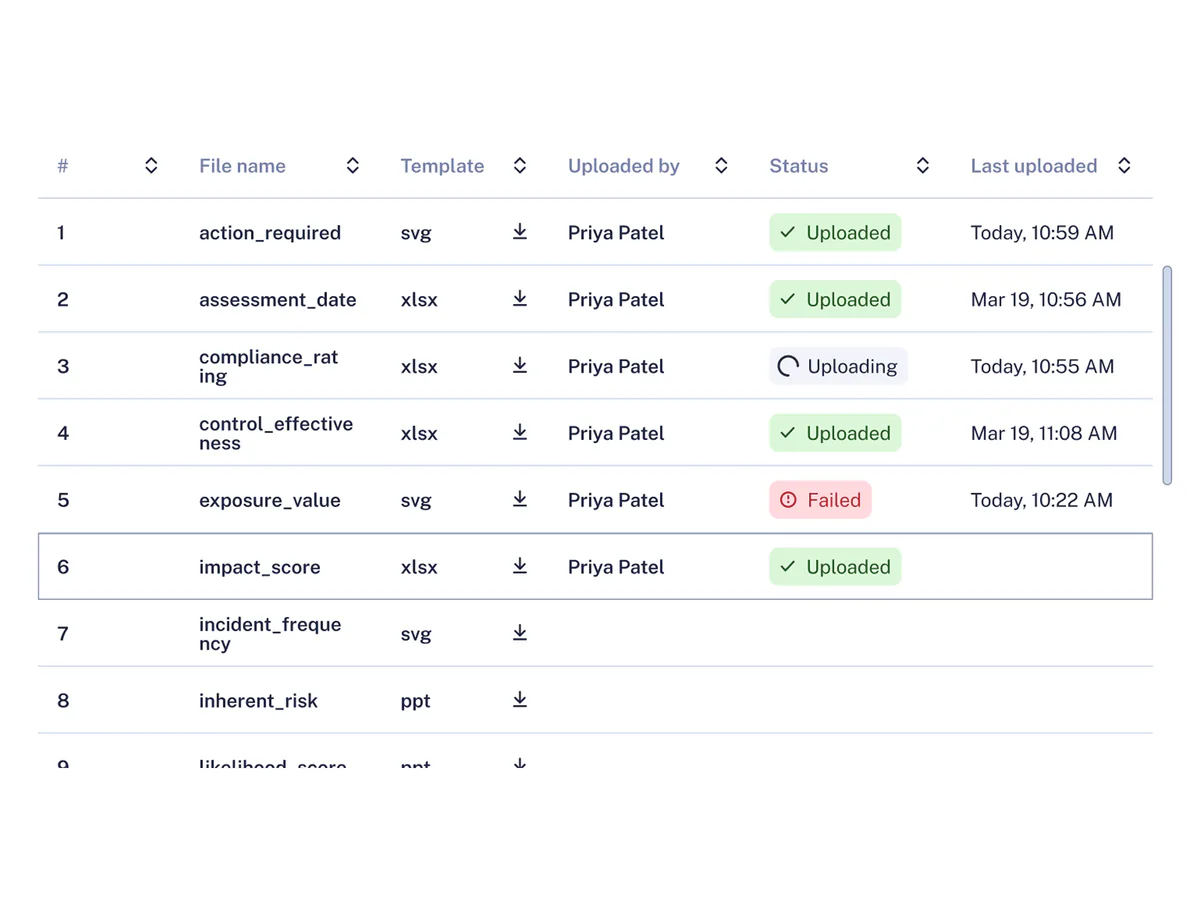
Users couldn't tell whether their files had uploaded, and nothing told them when they were done.
So each row now shows its own upload status, with Retry and Replace. Users see which file failed, fix only that one, and know when they're finished. A counter next to "Start status check" shows how many files are left, and the button turns on only when every file is in. Then an "Upload complete" state appears.
I looked at two other ideas. One progress bar for the whole upload was quick to build, but it shows how much is done, not which file failed. Pop-up messages after each upload disappear, so users can't check them later.
The downside of my choice: a busier table, with a status on every row.
Checking my own design before the retest
With only a few users available, I didn't want the retest to find problems I could find myself. A Figma agent skill did a first pass against Nielsen's heuristics. I reviewed every finding, dropped the ones that didn't fit our context, and ranked the rest by severity.
- 10
findings from the agent
- 7
kept after my review
- 2
high severity, both my own choices
- 2
fixed before the retest
| # | Finding | Why it matters | What I changed |
|---|---|---|---|
| 01 | No warning for a misplaced file | In a risk review, a file in the wrong row means wrong numbers. | The screen now flags it. |
| 02 | A cancel button in the file table | The table shows status and the drop area handles actions. The button broke that split and gave users two places to cancel. | Cancel lives only in the drop area. |
Every upload state, with both fixes in.
Results
We set three measures upfront, then ran the second test with the original users, unmoderated as before.
Do users get into the workflow?
Do users feel clear and confident about the upload?
Did it make the next quarterly review?
It’s a small sample, and these users had seen the task before, but they were real users doing real work.
Learnings
This project changed how I see my design system. I used to treat a component that worked in one product as safe in the next. I learned it's only proven for the task it was tested in: a new task means new users, new files and new ways to fail. Now I test every reused component in the new task, with real users, before the team builds on it.
Most importantly, the uploader was my miss. It had worked so well in another project that I didn't check it in this one, and a first step that fails hides everything behind it. Now I give entry and setup steps the same attention as the core experience, and I put them in the first round of testing.