From scattered events to a clear risk picture
An AI tool that flags outside events, like wildfires and strikes, estimates their cost to the bank, and lets risk analysts check every call.
MVP 0→1
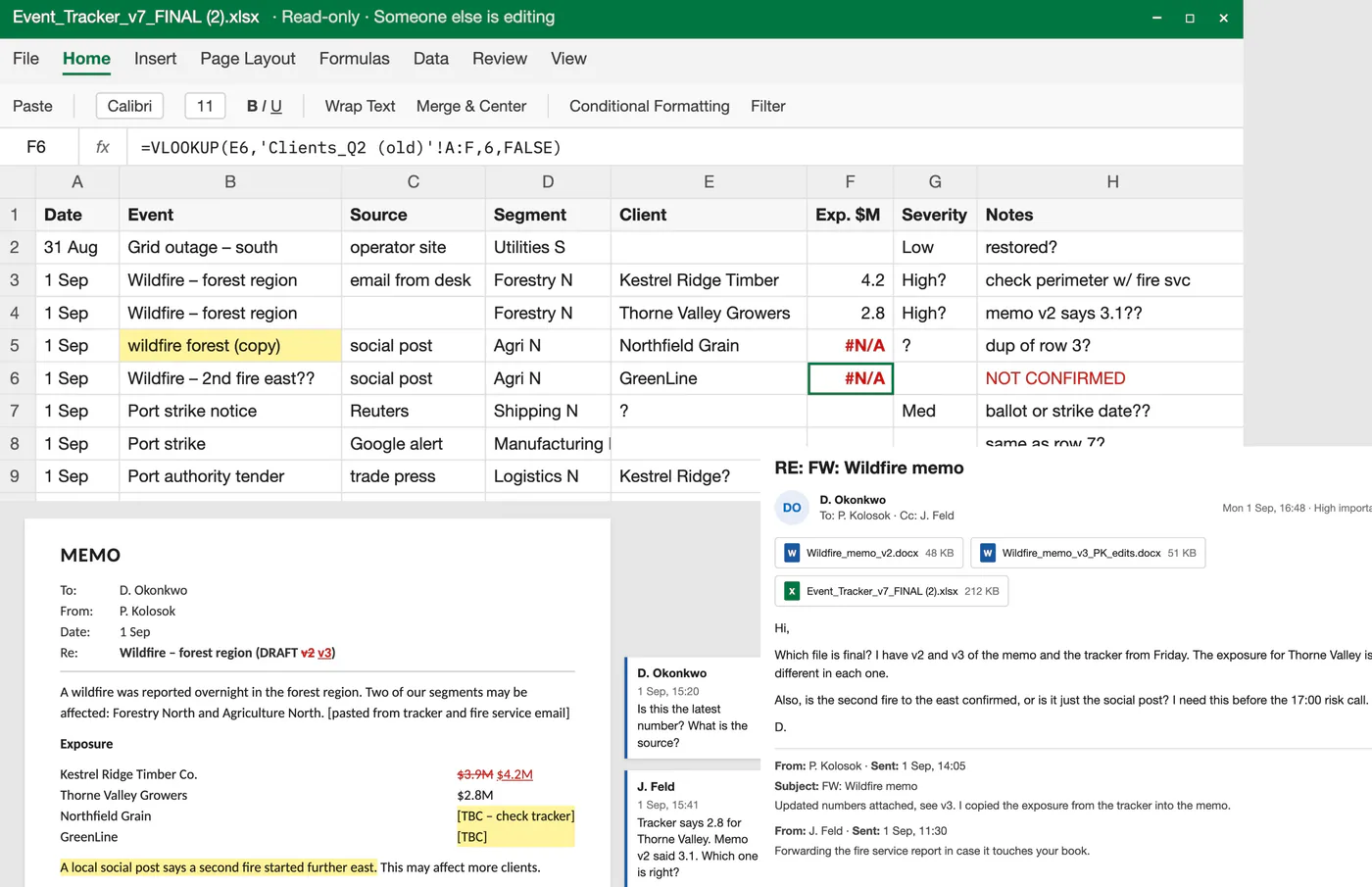 Before
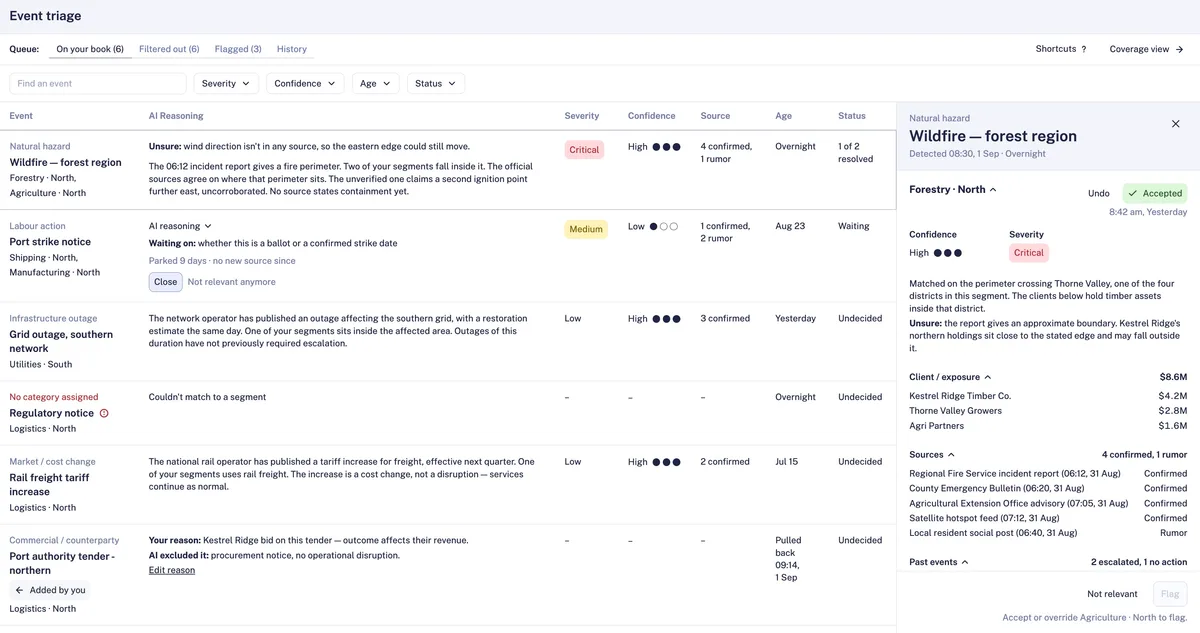 After · re-created
Under NDA. The research, decisions, testing and results are real. The screens are simplified re-creations in my own design system, with invented data, names and numbers. They show each decision, not the actual product.
Context
The bank's risk team gets dozens of outside events every week. Analysts checked each one by hand in Excel, which took so long that most events got skipped. In 2025, a regional flood reached managers 9 days late.
The team was building an AI to flag events and estimate their cost. I joined as the only designer, to design how analysts check the AI's picks.
Actions
How I got there
Worked without access to analysts
Analysts weren’t available until testing, so I interviewed the 3 PMs as experts and built a proto-persona of a portfolio risk analyst. I tagged each need by its source (PM interview, material, or guess), so the team could see what still needed checking with real analysts.
Found where the time goes
The goal was to make checking events faster, so I first looked at what slows it down today. With the PMs, I mapped one real event, a wildfire, step by step, the way an analyst handles it in the Excel files.
By the PMs' estimate, most of that time went into finding which clients were affected and checking sources. That showed me where the design could save the most time.
Split the problem into 5 questions
From the wildfire map, it came down to 5 questions an analyst answers before deciding: Does it affect our clients? How bad is it? How sure are we? What did we do last time? Who do I tell?
Each question became a list of data the engineers had to provide.
Tested with analysts
During test sessions with 4 analysts from 4 departments, I logged every mismatch between the design and how they worked and turned each one into a design change.
Before testing, each event had one general AI reasoning and its exposure across business areas. Analysts wanted to see how the AI got to those numbers. So we added reasoning for each business area, a breakdown of how the exposure was built, and the sources the AI used, so analysts can check them.

Key decisions
Let analysts check what the AI filtered out
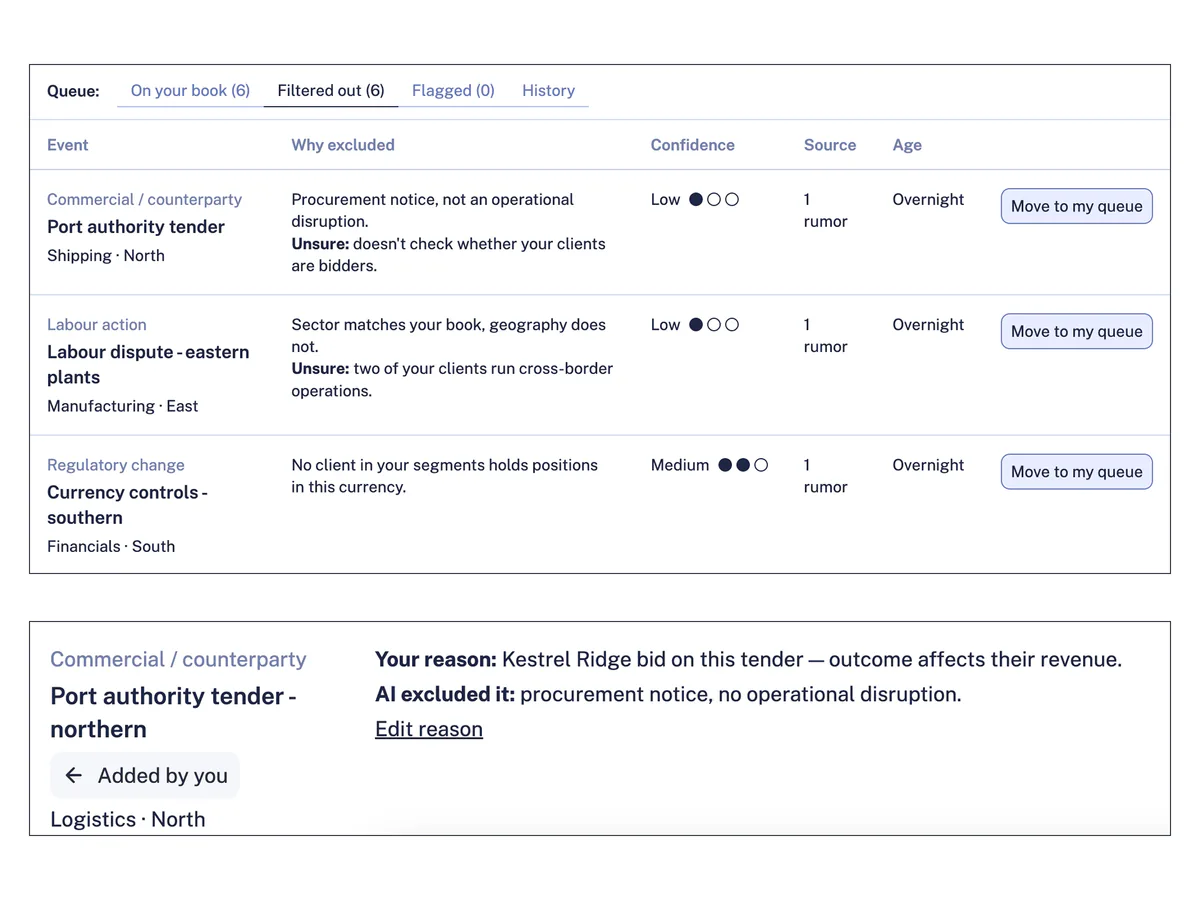
The AI shows each analyst only the events that affect their clients, but it can miss some. To catch those misses without cluttering the main list, I added a "Filtered out" tab, where every dropped event is listed with the AI's reason.
When an analyst disagrees, "Move to my queue" pulls the event back. The row is marked "Added by you" and shows the analyst's reason next to the AI's, and the model team receives it as a labeled mistake to learn from.
Neither simpler option worked. Showing every event would bring back the noise the AI was meant to remove. Showing only the AI's picks would keep its misses invisible. The tab takes a moderate build effort, and analysts get one more place to check.
Keep the queue short without hiding risk
Old events kept piling up. Undecided events from weeks ago sat next to overnight ones, and "Filtered out" grew every day. So I had to decide: when should an event leave the queue, and who decides? In a list that long, a new critical event gets lost, the same problem analysts had in Excel.
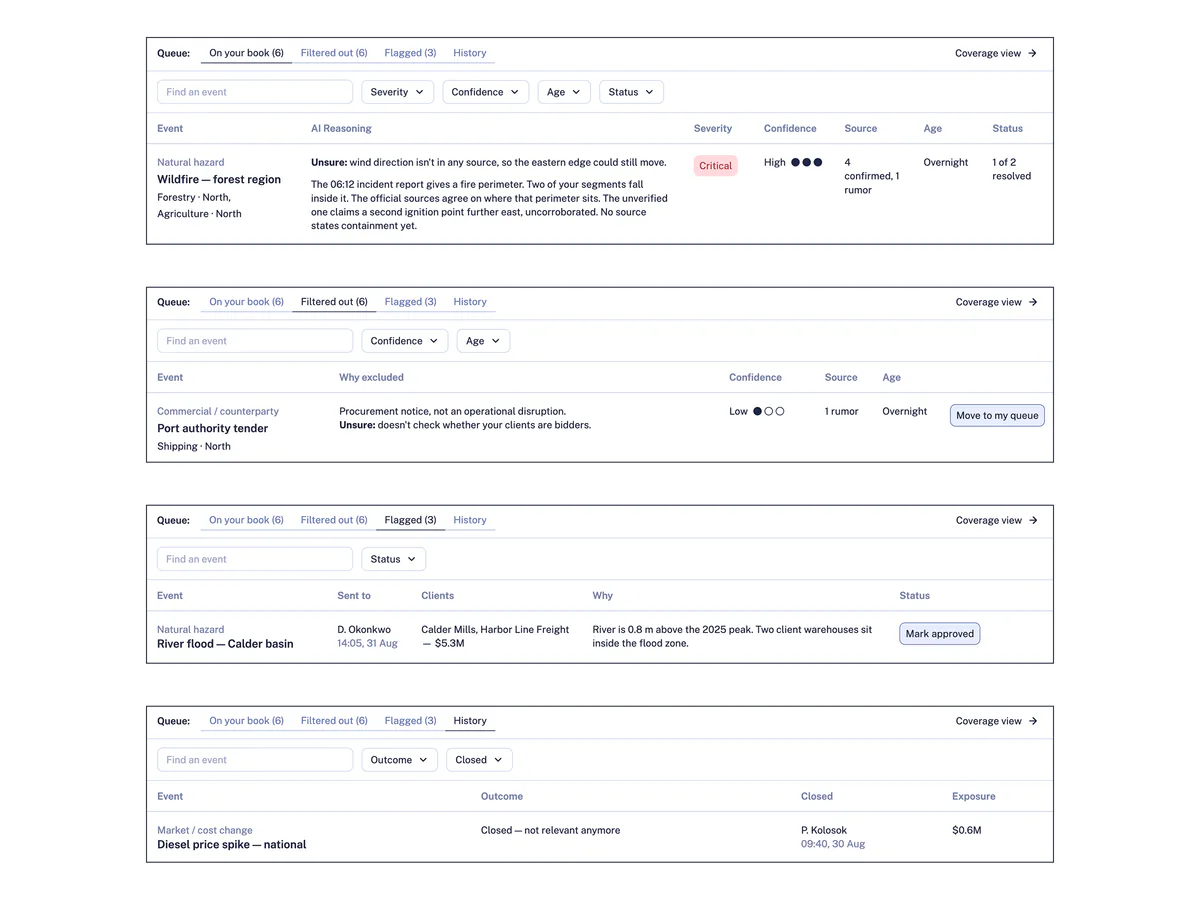
Each tab has its own rule, and every closed event says who closed it:
Decided events stay until the end of the day, so the next shift can check them. Parked events show how long they've waited, like "Parked 9 days · no new source since", and any new source starts the 7 days over.
Analysts see mostly fresh events, and nothing on their book disappears behind their back.
One rule for every tab would have been easier to build. If nothing ever left, new events would get buried again. If everything left after a fixed time, a critical event could vanish before anyone saw it. Per-tab rules cost more, because every event tracks when its last new source came in and when to move between tabs. And the list only stays short if analysts press Close.
Each business area gets its own answer
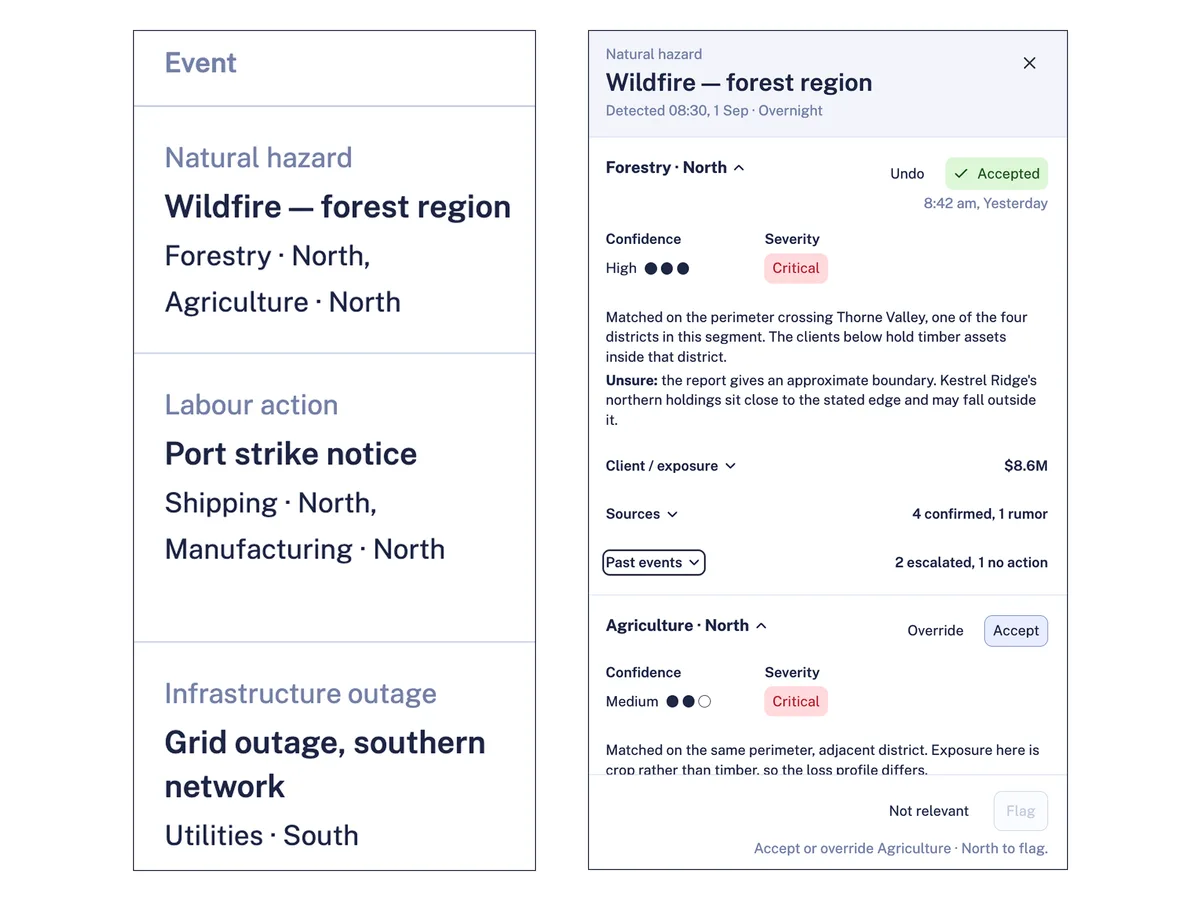
One event can hurt business areas in different ways. In the example, the AI is sure about a wildfire's losses in forestry, but not in farming. So each business area gets its own answer. Analysts don't have to accept or reject the whole event at once. They can accept forestry and question farming, and the row shows "1 of 2 resolved". An event touches only a few areas, so the screen stays simple.
Confidence shows how many confirmed sources agree. The "Unsure" line names what no source covers yet, so an answer can be high confidence and still have an open question, like the wildfire's wind direction.
One answer per event would have been the easiest to build, but a loss in farming could hide behind a sure call in forestry. One answer per client is the most exact, but a big event would need 10+ answers, which crowds the screen and slows analysts down. Answering per area costs more clicks when an event hits many areas.
Make the numbers easy to check
Analysts compare exposure across segments, so every amount uses one format ($4.2M) and is right-aligned. The total comes first, with each client listed below it.
Confidence uses filled dots plus a label (“High”, “Medium”), so it reads without color. Severity tags always show the word (“Critical”, “Medium”), so color is never the only signal.
Analysts work through long queues, so the table works with the keyboard: arrow keys move between events, Enter opens the details panel, and Esc closes it.
How I re-created the screens
- 01
FigJam
Designed the lo-fi flows and screens
- 02
Figma
Built an NDA-safe design system
- 03
Claude
Rebuilt the system in code
- 04
Reviewed the system
- 05
Claude
Built the hi-fi from the lo-fi
- 06
Tested each build as a user and fixed what got in the way
Testing each build led to 4 fixes:
- The table stays still. Confirmation messages pushed the table down, so users lost their place. They now appear at the bottom of the screen. I also added Undo, so any action can be reversed.
- Each tab has the filters it needs. Finding one event in a long list was hard. Each tab now has search and only the filters that matter there.
- The details panel behaves the same everywhere. It was always open, even on tabs it didn't belong to. Now it opens only when an event is selected, in every tab.
- The result of an action is visible. The latest action moves to the top of the list, so its result shows right away.
New patterns, like the confirmation with Undo, went back into my design system.
Invented data and names.
Results of the real MVP
We set the measure before launch, and the engineers built the tracking into the tool.
How long does one event take?
Is it in use?
What I'd measure next
These aren't tracked yet. Each one would show whether a key decision works.
- Filtered out tab: how often analysts pull an event back. That shows how many of the AI's misses the tab catches.
- Queue rules: how many open events sit past 7 days without a Close. That shows whether the queue really stays short.
- Answer per business area: how often analysts accept one area and override another. That shows whether split answers get used.
- Checking, not just accepting: how the accept rate and the time before accepting change over the months. That shows whether analysts still check the AI or start to trust it blindly.
Learnings
This project changed how I design AI tools. I used to think analysts would trust the AI once it was accurate enough. I learned that trust comes from being able to check it: seeing what the AI doesn't know and how sure it is. Now I design the checking as carefully as the answer.
Most importantly, I changed how I start projects. Working only through PMs meant my first designs rested on guesses, and some of them only surfaced in testing. Access to users isn't always possible, even when I ask. So when I can't reach them, I learn from the people and files closest to their work, tag every assumption as data or guess from day one, and rank the riskiest guesses, so they're the first thing we test once access opens.